Timestamp Converter: A Convenient Tool for Debugging Web Pages
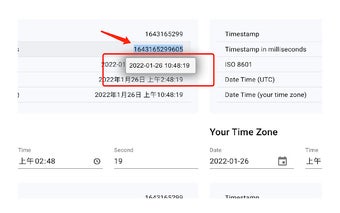
Timestamp Converter is a free Chrome add-on developed by Derek. It falls under the category of Browsers and is specifically classified as an Add-ons & Tools subcategory. This handy tool provides a popup readable date when you select any section containing a timestamp.
Top Recommended Alternative

With Timestamp Converter, debugging web pages becomes easier and more convenient. Whenever you come across a timestamp on a webpage, simply select it, and the add-on will automatically convert it into a readable time. This feature eliminates the need for manual calculations or searching for online converters, saving you time and effort.
By instantly converting timestamps into readable dates, Timestamp Converter enhances the debugging process, allowing developers to quickly identify and resolve issues related to time-based events. Its seamless integration with Chrome makes it easily accessible whenever you need it.
In conclusion, Timestamp Converter is a practical tool for web developers, offering a simple and efficient way to convert timestamps into readable dates. With its user-friendly interface and automatic conversion feature, it streamlines the debugging process, enabling developers to easily identify and resolve time-related issues on web pages.